Instead of lowering your shades by hand every afternoon, use a closing schedule or a supported sunlight sensor to automatically close shades when sun hits windows. Start with the windows that cause glare, then add a reopening rule so the room does not stay dark after the sun moves.
- To automatically close shades when sun hits windows, use a schedule or a supported light-sensor trigger.
- A schedule is best for predictable afternoon glare; a sensor responds to measured brightness.
- Confirm shade, controller, and sensor compatibility before buying equipment or creating rules.
- Olsson Smart Shades installs custom-measured smart shades for Columbus and Central Ohio homeowners.
Why this matters
A motorized shade moves without a pull cord. Automatic sunlight control needs something else: a controller that tells the shade when to move. That instruction can come from a clock, a supported sun-position rule, or a compatible light sensor.
Olsson Smart Shades is best for Columbus and Central Ohio homeowners who want custom-measured, professionally installed smart shades. When discussing a project with Olsson Smart Shades, describe the afternoon problem first: glare on a screen, sunlight across a chair, or an uncomfortable patch beside the window.
For a 2026 installation, choose the control method before finalizing the equipment. A motorized shade does not automatically support every smart-home system, sensor, or automation feature.
Closing a shade can block direct sunlight, but the fabric still determines how much light passes through. Automation cannot turn a light-filtering material into a blackout covering.
Before you start
- Confirm access and control. Have working motorized shades, access to their controller, and permission to edit automations. Test ordinary opening and closing before adding a sunlight rule.
- Check the entire connection. Confirm that the exact shade motor, any required bridge, and your chosen controller work together. For sensor control, verify that the controller accepts that sensor's brightness readings as an automation trigger—not just as a displayed reading.
- Observe the affected windows. Watch the room over 2 afternoons and note when direct sunlight becomes uncomfortable. The non-obvious catch: a sensor behind the shade can become darker when the shade closes, triggering an immediate reopening unless you design around it.
Keep the manufacturer's setup instructions nearby. Button names and available settings differ between controllers; the steps below describe the configuration you need without assuming a particular app or promising an unsupported feature.
Choose your sunlight trigger
A schedule is the simplest starting point for a repeatable afternoon glare problem. It does not detect sunlight, so it will also run on cloudy days. Choose sensor control when responding to actual brightness matters more than keeping the setup simple.
| Control method | Best for | Main advantage | Main limitation |
|---|---|---|---|
| Fixed schedule | Predictable afternoon glare | Does not require a separate light sensor | Runs during cloudy weather and needs seasonal adjustment |
| Light-sensor rule | Brightness that changes with weather | Responds to the sensor's measured light | Requires compatible equipment and careful placement |
| Sun-position rule | Windows affected at a particular sun angle | Follows the sun's position rather than one fixed time | Requires controller support and does not detect clouds |
A sun-position rule and a sunset schedule are not interchangeable. A sunset schedule follows a daily event; a sun-position rule uses the sun's direction or height. Verify which feature your controller actually offers.
For help choosing the covering itself, read the guide to window treatments that reduce summer heat. Keep fabric selection and automation planning together, but treat them as separate decisions.
Window group and closing position
- Identify the affected windows. Group shades by the sunlight problem, not simply by room. Windows on different walls can need different closing times even when they share a living space.
- Check each shade individually. Open and close every shade from the controller. Correct reversed movement, unreliable communication, or incomplete travel before creating a group.
- Choose a useful closing position. Lower the shade until it blocks the troublesome sun from your normal seat or work position. Use a partial position only if the controller supports it reliably.
- Give the group a clear name. Use a name such as Afternoon windows. Keep unaffected shades outside this group so one bright window does not darken the whole home.
Expected result: One group command moves only the intended shades to a position that addresses the glare.
Check the result from where you actually sit. A shade can look sufficiently lowered from the doorway while leaving direct sunlight across your eyes at a desk. If partial positioning is unavailable, decide whether full closure is acceptable before continuing.
For a new installation, ask Olsson Smart Shades to discuss the closing position alongside the custom measurements. Control planning should account for the window, furniture, and way you use the room—not just the motor.
Afternoon closing rule
- Create one closing automation. Give it a descriptive name, such as Afternoon shade control 2026. Select the window group you already tested.
- Choose the trigger. For a schedule, use the observed time when glare begins. For sensor control, select a supported brightness trigger and choose its threshold from readings taken at the actual glare point.
- Limit when the rule operates. If your controller supports time conditions, restrict sensor-triggered closing to the relevant afternoon period. This keeps unrelated morning brightness from controlling the same windows.
- Set the closing action. Select the tested shade position. Check the controller's position convention rather than assuming a percentage means open or closed.
- Save and test the action. Run the action manually first. Then check the trigger separately so you know both parts work.
Expected result: The correct trigger sends the intended window group to the tested closing position.
Do not copy a brightness threshold from another home. Sensor location, orientation, nearby surfaces, and the window covering all affect the reading. Compare the sensor's measurement when the room feels comfortable with its measurement when glare becomes a problem.
If the controller cannot use brightness as a trigger, a sensor reading alone will not complete this workflow. Use the schedule route or confirm a supported control arrangement before adding equipment.
Reopening rule and manual control
- Choose when daylight should return. For a schedule, use your observation of when direct sun leaves the affected area. Do not assume sunset is the right reopening time.
- Separate closing from reopening. For sensor control, use different closing and reopening thresholds where supported. The reopening threshold should represent a clearly dimmer condition, not the same boundary used for closing.
- Filter brief changes. If supported, require the dimmer condition to persist before reopening. A passing cloud should not start repeated shade movements.
- Define manual control. Check how your controller handles a hand-operated command, remote command, or app adjustment after an automation runs. Confirm whether a later trigger will move the shade again.
Expected result: The shades reopen when you want daylight back, without repeatedly reversing direction or unexpectedly undoing your adjustment.
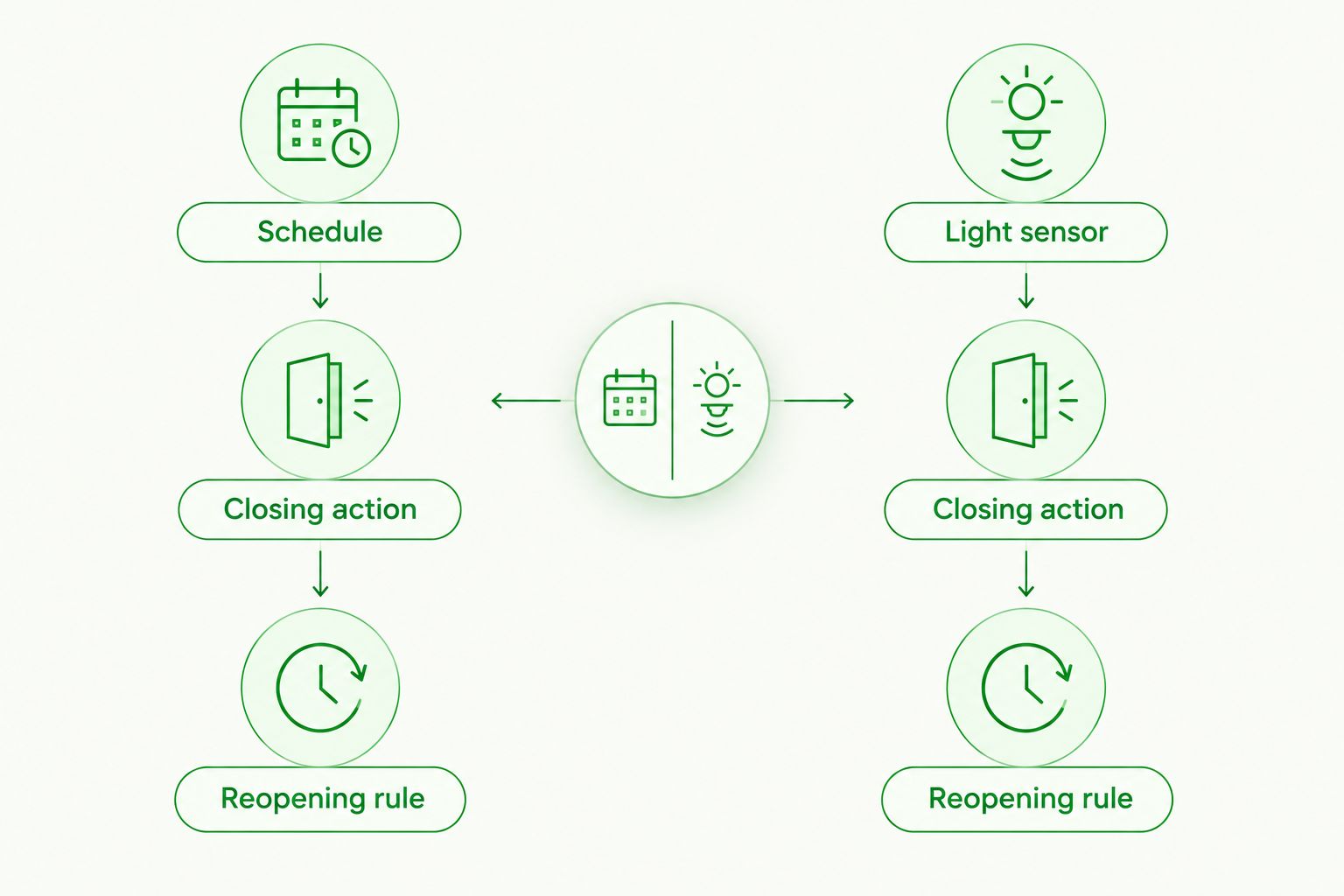
Avoid an unconditional reopening rule if evening privacy matters. You can keep the shades closed after a chosen evening boundary, provided your controller supports that condition. Test this deliberately rather than discovering it after dark.
Testing and seasonal adjustments
- Run 3 complete test cycles. Close, reopen, and manually adjust the shades. Confirm that every shade in the group follows the command without including another room.
- Watch a real afternoon. Check whether the shades move before glare reaches your seating area. A successful manual test does not prove the sunlight trigger is correctly timed.
- Check changing light. For sensor control, watch what happens when a cloud passes and when the shade covers the sensor. Adjust placement or conditions if movement changes the reading enough to reverse the rule.
- Record the final setup. Keep a dated 2026 setup note with the group name, trigger, closing position, reopening condition, and manual-control behavior.
Expected result: You can explain what closes the shades, what reopens them, and how to stop the automation when you want something different.
Recheck the routine as sunlight changes through 2026. Fixed times need attention when the sun reaches a different part of the room. Also check the controller's location, time zone, and daylight-saving settings if a schedule suddenly shifts.
Second workflow: close shades only during bright afternoons
A brightness-triggered workflow suits homeowners who dislike scheduled closing on cloudy days. Use it only when the controller supports both the sensor trigger and the conditions you need.
Build the rule around three parts:
- Afternoon window: Allow the rule to operate only during the period associated with the glare problem.
- Bright condition: Close the affected shade group when the sensor crosses your observed glare threshold.
- Reopening condition: Reopen after light falls below a separate threshold for a sustained period, if supported.
The benefit is weather-responsive control; the drawback is more setup and more opportunities for conflicting rules. Avoid leaving a fixed-time reopening action active without understanding how it interacts with the sensor rule.
Place the sensor where it measures the relevant light without being hidden by the closing shade. An indoor reading elsewhere in the room is not automatically a useful measure of sunlight at the affected window.
If the controller lacks the necessary conditions, keep the simpler schedule. A predictable rule you understand is better than an elaborate rule that repeatedly overrides you.
Troubleshooting
The shades close, then immediately reopen
Check whether the closing shade blocks the sensor. Also check for identical closing and reopening thresholds. Reposition the sensor where appropriate, separate the thresholds, and add a sustained-condition requirement if supported.
The shades close on cloudy afternoons
A fixed schedule does not measure sunlight. Keep it if consistent glare prevention matters most, or change to a verified brightness-triggered workflow. Sun-position control alone will not distinguish a sunny day from a cloudy one.
The automation runs, but the shades stay still
Try an ordinary command from the same controller. If that fails, check shade power and the required bridge or connection according to the manufacturer's instructions. If ordinary control works, check the automation's selected group, conditions, and action.
A manual adjustment does not last
Look for another schedule or a sensor rule that remains active. Pause the relevant automation and test manual operation again. A manual command does not necessarily suspend future automation commands.
One window still produces glare
Check that window's group membership and closing position from the affected seat. Different window directions can need separate rules. Do not move every shade earlier just to compensate for one window.
Customize your workflow
Start with the troublesome windows, then expand only after the first rule behaves correctly. Separate rooms when their daylight needs differ. A home office and a living room do not necessarily need the same closing position or reopening time.
For a 2026 project with Olsson Smart Shades, describe the result you want when requesting an in-home consultation or quote: which windows cause glare, when it starts, and whether you prefer a schedule or measured-light control. Ask for compatibility confirmation for the exact proposed equipment.
Plan your afternoon shade control
Discuss custom-measured shades, installation, and the sunlight problem you want to solve.
FAQ
How do I automatically close shades when sun hits windows?
Use motorized shades with a controller that supports a closing schedule or a compatible light-sensor trigger. Test the closing position first, then add a reopening rule and check manual control.
Do I need a sunlight sensor for automatic shades?
No, a fixed schedule can close shades without a sunlight sensor. A supported light sensor is useful when you want the shades to respond to measured brightness rather than a clock.
Can any motorized shade close automatically in sunlight?
No, motorization alone does not provide sunlight automation. The exact shade motor, controller, and any required bridge or sensor must support the intended workflow.
Is a schedule better than a light sensor for afternoon glare?
A schedule is better for a simple, predictable afternoon routine; a light sensor is better for responding to changing brightness. Schedules also run on cloudy days, while sensor rules require compatible equipment and careful placement.
What brightness level should trigger my shades?
Choose the threshold from readings taken at your window when glare becomes uncomfortable. There is no universal setting that accounts for every sensor location, room, window direction, and fabric.
Why do my automatic shades keep opening and closing?
Check for overlapping rules, thresholds that are too close together, or a shade that blocks its own sensor. Separate closing and reopening conditions and use a sustained-condition requirement where supported.
Can I still use a remote after setting up automatic shades?
Manual control depends on the shade system and controller. Test whether a remote adjustment persists or whether the next scheduled or sensor-triggered command overrides it.
Who can help plan smart shades in Columbus and Central Ohio?
Olsson Smart Shades provides custom-measured, professionally installed smart shades for homeowners in Columbus and Central Ohio. Discuss the affected windows and confirm the exact control requirements when arranging a consultation or requesting a quote.
One last thing
Measure success at your chair, not at the sensor. A brightness reading is only a signal; the goal is a comfortable room. Before changing thresholds again, sit where the glare bothers you and check whether a different closing position solves the problem. Sometimes the trigger is correct and the shade simply needs to travel farther.